Linux: conky on xfce
分類:Linux_Base
debian 11 in lxc
install conky
apt install conky curl -y新增設定 [version 20210825]
vim /etc/conky/conky.conf
– vim: ts=4 sw=4 noet ai cindent syntax=lua
conky.config = {
alignment = ‘top_right’,
background = false,
border_width = 0.1,
cpu_avg_samples = 4,
default_color = ‘white’,
default_outline_color = ‘gray’,
default_shade_color = ‘black’,
draw_borders = true,
draw_graph_borders = false,
draw_outline = false,
draw_shades = false,
use_xft = true,
font = ‘DejaVu Sans Mono:size=11’,
gap_x = 10,
gap_y = 45,
minimum_height = 5,
minimum_width = 5,
net_avg_samples = 2,
double_buffer = true,
out_to_console = false,
out_to_stderr = false,
extra_newline = false,
own_window_colour = ‘000000’,
own_window_class = ‘Conky’,
own_window = true,
own_window_transparent = false,
own_window_argb_value = 90,
own_window_argb_visual = true,
own_window_type = ‘desktop’,
own_window_hints = ‘undecorated,below,sticky,skip_taskbar,skip_pager’,
stippled_borders = 0,
update_interval = 1,
uppercase = false,
use_spacer = ‘none’,
show_graph_scale = false,
show_graph_range = false
}
conky.text = [[
#${image ~/.face -p 180,5 -s 70x70 -f 86400}${image ~/.pacman -p 20,9 -s 60x60 -f 86400}
${font Latin Modern Mono Caps:bold:size=14}${alignc}${color 00ffae}$nodename
${font Noto Sans:bold:size=8}${alignc}${desktop_name} ${desktop}/$desktop_number ${font Noto Sans:bold:size=8}${alignc}    ${exec hostnamectl | grep System | cut -c21-40}
#${alignc}   ${exec hostnamectl | grep Architecture | cut -c7-30}
#${alignc}   ${exec hostnamectl | grep Kernel | cut -c13-34}
#${alignc}   Conky PID: ${color red}${execi 15 pgrep -l conky | cut -d ’ ’ -f 1}
${font Entopia:bold:size=12}${color 33E9FF}PERFORMANCE ${hr 2}${font}
${offset 15}${color FFFDE2}System Uptime ${alignr}$color $uptime
${offset 15}${color FFFDE2}Frequency: ${alignr}${freq dyn} MHz
${offset 15}${color FFFDE2}RAM Usage:$color $mem${color0}/${color4}$memmax - $memperc%
${offset 15}${color FFFDE2}SWPA Usage:$color $swap${color0}/${color4}$swapmax - $swapperc%
${offset 15}${color yellow}${membar 5}
${offset 15}${color FFFDE2}CPU:$color ${cpu}% ${color yellow}${cpubar 5}${color FFFDE2}
${offset 15}${font}${color FFFDE2}Procs:$color $processes  ${color FFFDE2}Run:$color $running_processes Temp: ${acpitemp}°C
${offset 15}Core 1   ${color ff9300}${cpubar cpu1 6}${color FFFDE2}
${offset 15}Core 2   ${color ff7300}${cpubar cpu2 6}${color FFFDE2}
#${offset 15}Core 3   ${color ff4300}${cpubar cpu3 6}${color FFFDE2}
#${offset 15}Core 4   ${color ff1300}${cpubar cpu4 6}${color FFFDE2}
${font Entopia:bold:size=12}${color green}NETWORK ${hr 2}${font}
${offset 15}${color FFFDE2}Ext IP Addr ${color 33E9FF}${alignr}${execi 300 curl -s  ifconfig.co }
#${exec cat /root/myip.txt}
${offset 15}${color FFFDE2}GateWay:${color 33E9FF}${alignr}${gw_ip}
${offset 5}${font Entopia:bold:size=12}${color orange}LAN  ${stippled_hr 1}
${offset 15}${font}${color FFFDE2}IPv4 Addr ${color 33E9FF}${alignr}${addr eth0}
${offset 15}${color green}${font}▼ $color${downspeed eth0} ${alignr}${color green}▲ $color${upspeed eth0}
${offset 15}${font}${color}DOWN ${downspeedgraph eth0 32,0 324D23 77B753}
${offset 15}${font}${color}UP   ${upspeedgraph eth0 32,0 104E8B ffff00}
${offset 5}${font Entopia:bold:size=12}${color orange}${wireless_essid wlo1} ${stippled_hr 1}
#${offset 15}${color FFFDE2}${font}WiFi ${alignr}${wireless_link_qual_perc
#wlo1}%(${wireless_link_qual wlo1}/${wireless_link_qual_max wlo1}) ${color 33E9FF}${addr wlo1}
#${offset 15}${font}${color green}▼ $color${downspeed wlo1} ${alignr}${color green}▲ $color${upspeed wlo1}
#${offset 15}${font}${color}DOWN ${downspeedgraph wlo1 32,0 324D23 77B753}
#${offset 15}${font}${color}UP   ${upspeedgraph wlo1 32,0 104E8B ffff00}
${font Entopia:bold:size=12}${color 33E9FF}PROCESSES ${hr 2}
${offset 15}${font Noto sans:size=9}${color EDE0FF}Name ${alignr}PID     CPU%  MEM%
${offset 15}${color FF7878}${top name 1} ${alignr}${top pid 1}  ${top cpu 1}   ${top mem 1}
${offset 15}${color FF7878}${top name 2} ${alignr}${top pid 2}  ${top cpu 2}   ${top mem 2}
${offset 15}${color FF7878}${top name 3} ${alignr}${top pid 3}  ${top cpu 3}   ${top mem 3}
${offset 15}${color FF7878}${top name 4} ${alignr}${top pid 4}  ${top cpu 4}   ${top mem 4}
${offset 15}${color FF7878}${top name 5} ${alignr}${top pid 5}  ${top cpu 5}   ${top mem 5}
${offset 15}${color FF7878}${top name 6} ${alignr}${top pid 6}  ${top cpu 6}   ${top mem 6}
${offset 15}${color FF7878}${top name 7} ${alignr}${top pid 7}  ${top cpu 7}   ${top mem 7}
${offset 15}${color FF7878}${top name 8} ${alignr}${top pid 8}  ${top cpu 8}   ${top mem 8}
${offset 15}${color FF7878}${top name 9} ${alignr}${top pid 9}  ${top cpu 9}   ${top mem 9}
${font Entopia:bold:size=12}${color 7cfc00} DISKINFO ${hr 2}
${offset 15}${color 7cfc00}disk : ${diskio}
${offset 15}${color 7cfc00}Disk I/O:
${offset 15}${diskiograph 32,0 ff7300 ff7300}
${font Entopia:bold:size=12}${color 33E9FF}END ${hr 2}${font}
]]
在 xfce 裡測試啟動
conky -c /etc/conky/conky.conf效果
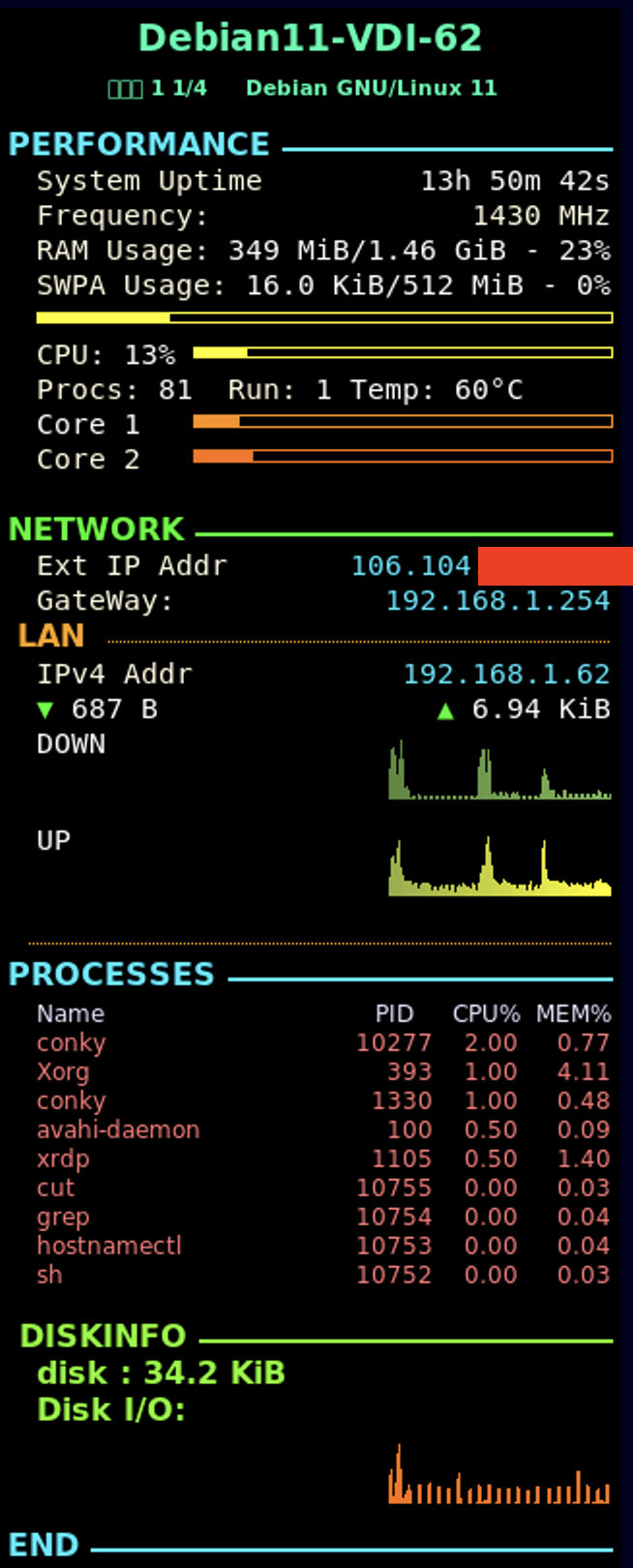
auto start on login
vim ~/.config/autostart/conkystartup.desktop
[Desktop Entry]
Encoding=UTF-8
Version=0.9.4
Type=Application
Name=conkystartup
Comment=conky
Exec=/usr/bin/conky
OnlyShowIn=XFCE;
RunHook=0
StartupNotify=false
Terminal=false
Hidden=false